
1. Pick a chord
Tap any chord button (C, G, D, A, E, Am, Em, Dm) or press keys 1–8. Switching chords updates the string voicings without auto-playing until you strum.
Pick a chord, then drag across the strings.
Standard tuning: E–A–D–G–B–e · Tap a string or drag across to strumKeys 1–8 switch chords · Focus strings + ↑/↓ to strum
How to play
This browser-based online guitar simulator gives you six standard-tuned acoustic strings and eight open chords ready to play right away—no physical guitar, sign-up, download, or webcam required. Pick a chord, strum downward or upward across the strings, and hear how each voicing rings out.
Every string calculates its individual pitch from the active chord shape rather than triggering a single pre-recorded chord sample. That means single-string plucks, slow arpeggios, fast downstrokes, and reverse upstrokes each sound distinct and respond immediately to the speed of your hand or pointer.

Tap any chord button (C, G, D, A, E, Am, Em, Dm) or press keys 1–8. Switching chords updates the string voicings without auto-playing until you strum.
Drag down or up across the six strings to hear each note in order, tap a single string to pluck one note, or use the Strum button and ↑/↓ arrow keys when the strings are focused.
Click Try a chord progression to step through C → G → Am → Em at your own pace, listening to how each open chord transitions into the next.
The virtual guitar is tuned to standard E–A–D–G–B–e from lowest bass string (E2) to highest treble string (E4). Each chord button updates the fretted notes and muted (×) bass strings without auto-playing, so you control the exact moment of your next strum. Drag downward for a low-to-high downstroke, or upward to reverse the pick order.
Frets: × 3 2 0 1 0
× · C3 · E3 · G3 · C4 · E4
Frets: 3 2 0 0 0 3
G2 · B2 · D3 · G3 · B3 · G4
Frets: × × 0 2 3 2
× · × · D3 · A3 · D4 · F#4
Frets: × 0 2 2 2 0
× · A2 · E3 · A3 · C#4 · E4
Frets: 0 2 2 1 0 0
E2 · B2 · E3 · G#3 · B3 · E4
Frets: × 0 2 2 1 0
× · A2 · E3 · A3 · C4 · E4
Frets: 0 2 2 0 0 0
E2 · B2 · E3 · G3 · B3 · E4
Frets: × × 0 2 3 1
× · × · D3 · A3 · D4 · F4
Whether you are testing chord progressions on a laptop trackpad, strumming on a phone screen, or trying hands-free air strumming on desktop, every input method shares the same six-string audio engine and voicing rules.
Click any single string to pluck one note, or press and drag downward or upward across the six-string deck for a full strum.
Best for: Quick chord checks, bass-to-treble arpeggios, and comparing downstrokes vs. upstrokes on desktop.
Tap chord pills above the neck and swipe across the strings. Touch outside the string bed scrolls the page normally.
Best for: Immediate two-thumb practice on phones and tablets without needing a physical instrument.
Press 1–8 to select C, G, D, A, E, Am, Em, or Dm; focus the string deck and press ↑ or ↓ to strum up or down, or use Strum.
Best for: Fast chord-switching drills and accessible non-pointer strumming without moving your hands off the keys.
Click Play with your webcam to select chords with one hand and pluck single strings or air-strum with the other.
Best for: Hands-free air-guitar strumming and testing browser hand tracking on desktop.
Using the optional webcam mode? Hand tracking runs locally inside your browser with no video upload and no microphone access. Read our webcam privacy guide or browser compatibility checklist if your device blocks camera or audio permissions.
Webcam gesture tutorial
Click Play with your webcam at the top of the page on desktop to enter fullscreen hand-tracking mode. Your left hand selects any of the eight open chords while your right hand plucks individual strings or sweeps across the virtual strum band.
Click Play with your webcam on desktop and allow camera access (video only, processed locally in your browser).
Sit in front lighting with both hands clearly visible and separated on opposite sides of the frame.
Show a left-hand chord pose (1–5 fingers or special combos) and hold steady ~0.1s until the Chord hand pill turns Stable.
Use your right hand to pinch-pick individual strings in 6-String Pluck mode, or switch to Full Strum for broad air strums.
The images below match your mirrored front-facing webcam view. Hold each pose for a fraction of a second until the top Chord hand indicator turns Stable.
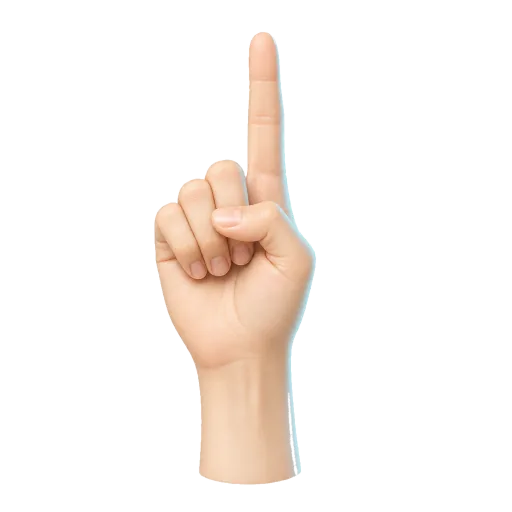
Raise your index finger only. Hold steady briefly until the Chord hand badge turns Stable.
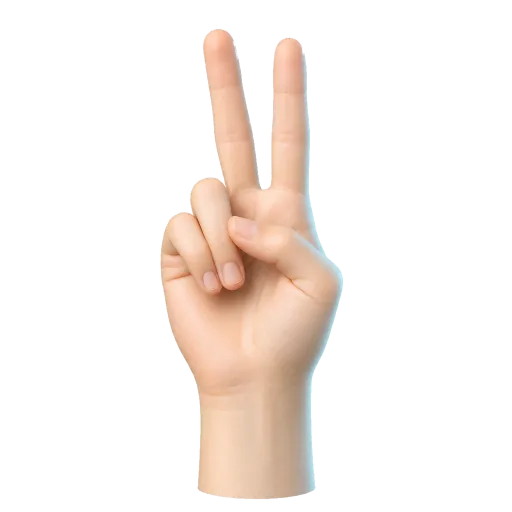
Raise your index and middle fingers together to select G major.
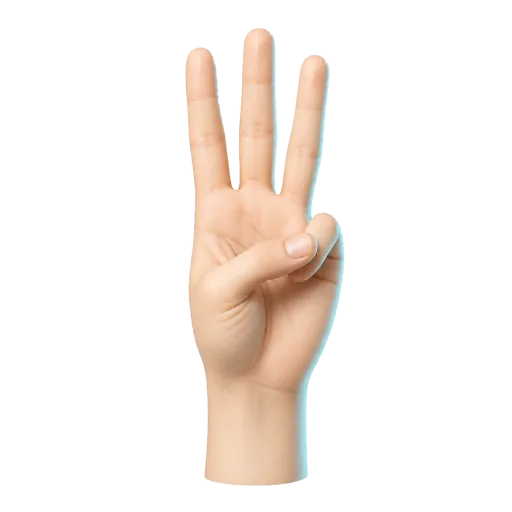
Raise your index, middle, and ring fingers to select D major.
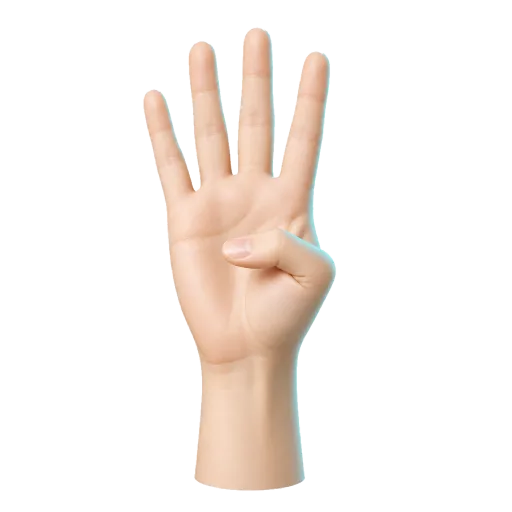
Raise all four fingers with your thumb tucked inward to select A major.
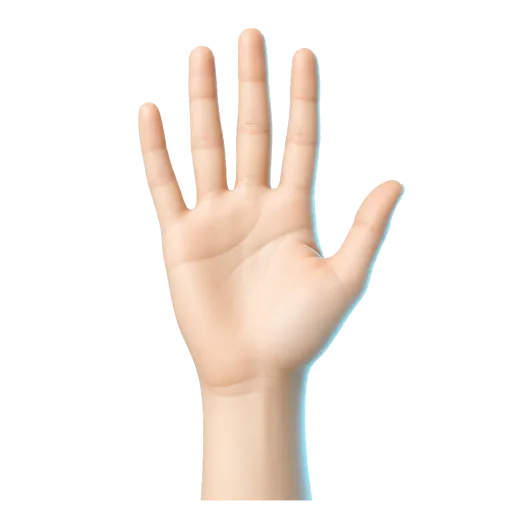
Spread all five fingers in an open hand to select E major.
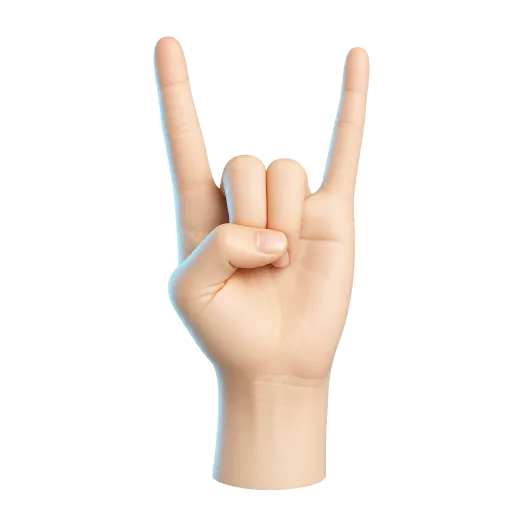
Extend only your index and pinky fingers (special combo) to select A minor.
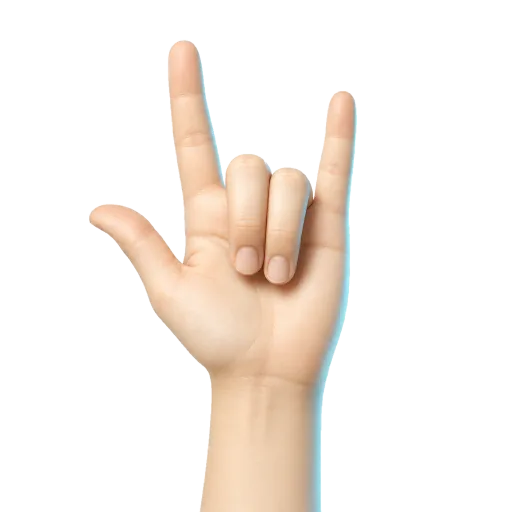
Extend your thumb, index, and pinky fingers together to select E minor.
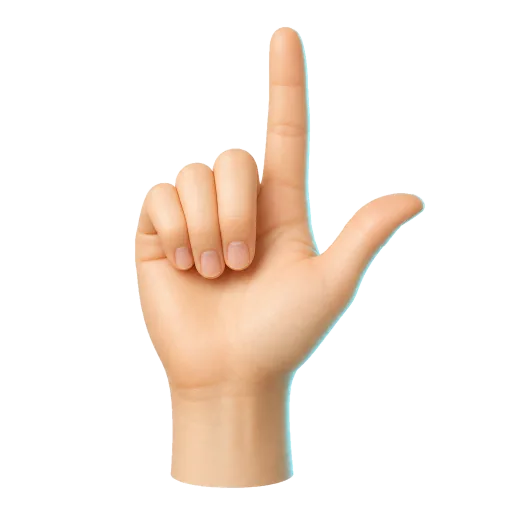
Form an open L-shape with your thumb and index finger to select D minor.
Choose 6-String Pluck (with Pinch Pick or Direct Swipe) for single-string melodies and arpeggios, or switch to Full Strum to sweep whole chords across the glowing band. You can also click Gestures inside webcam mode anytime for this reference.
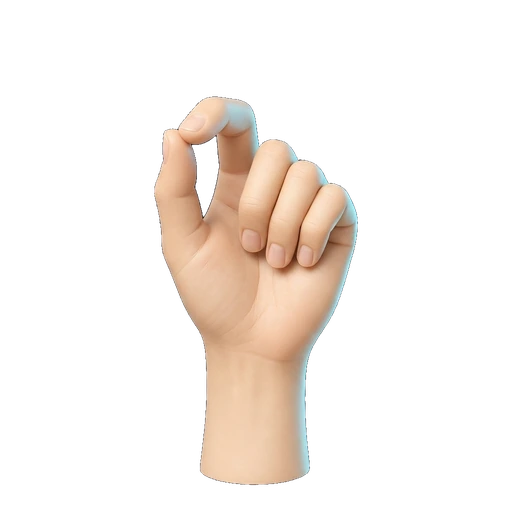
Default mode. Aim the reticle over a string and pinch thumb and index finger to pluck one note—or hold the pinch and sweep across multiple strings.
Switch trigger to Direct Swipe, then move your right index fingertip vertically across any string line to pluck individual notes without pinching.
Switch play mode to Full Strum, raise your hand above the glowing band to arm, and sweep downward for a downstroke or upward from below for an upstroke.
You do not need dozens of barre chords to hear how real progressions move. Click Try a chord progression above the strings to walk through C → G → Am → Em at your own speed, then try these three loops using keys 1–8:
Built directly into the Try a chord progression helper above. Notice how C skips the low E string, G brings in all six strings for a wider bass foundation, and Am → Em shifts smoothly toward warmer minor tension.
Compare the full six-string ring of G and Em with the focused four-string brightness of D major (where both the low E and A strings stay muted). Great for practicing clean downward and upward strums.
Practice shifting between five-string Am, four-string Dm, and six-string E major. Listening closely to the lowest playable bass note in each voicing helps train your ear for chord changes.
Explore Gesture Synth
Open Gesture Synth to conduct sustained synth chords, seventh voicings, octave shifts, and filter sweeps with your webcam—or test scale degrees with tap and keyboard controls.
No. You can pick any chord and strum the six strings immediately with a mouse, touchscreen, or keyboard—no webcam, sign-up, or download required. On desktop, you can also click Play with your webcam to try optional hand-tracked chord selection and air strumming (processed locally with no microphone or video upload).
It uses standard six-string guitar tuning (E–A–D–G–B–E from low to high: E2, A2, D3, G3, B3, and E4) and includes eight essential open chords: C, G, D, A, E, Am, Em, and Dm.
The × marks a muted string that is skipped in that open chord voicing—for example, the low E string in C major, Am, and Dm, or both the low E and A strings in D major—so your strum stays clean and accurate without muddy bass notes.
Yes. On a desktop keyboard, press keys 1 through 8 to switch open chords, then use the Strum button or the Up and Down arrow keys when the string bed is focused. On mobile or tablet touchscreens, drag smoothly across the strings to strum or tap individual strings to pick single notes without hijacking normal page scrolling outside the string deck.
Each playable string triggers its own individual guitar note in the physical order your pointer or swipe crosses it. Dragging downward strums from the low bass strings toward the high treble E string, while dragging upward reverses the order from treble to bass so downstrokes and upstrokes sound distinct.
When you click Play with your webcam on desktop, the page loads local browser hand tracking: one hand selects open chords while the other hand plucks individual strings or strums across the virtual trigger zone. Camera frames stay in your browser—no video is recorded or uploaded, and no microphone permission is requested.
Virtual Guitar gives you a six-string strumming instrument you can play right away with mouse, touch, or keyboard. Gesture Synth uses webcam hand tracking (with an optional tap and keyboard practice mode) to conduct sustained synth chords, inversions, and filter sweeps.